


Pleco Chinese Dictionary
4.62.08K Reviews
App Specs
- Version
- Varies with Device
- Updated On
- License
- Free
- Downloads
- 5,000,000+
- Developer
- Pleco
- Categories
- Books & Reference
- Platform
- Android, iOS
Screenshots
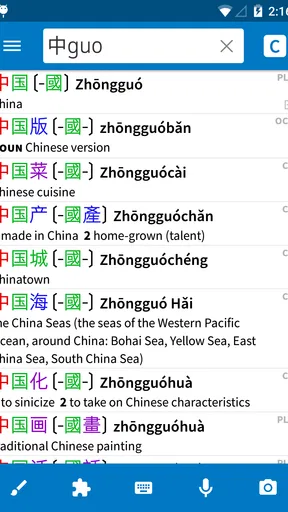
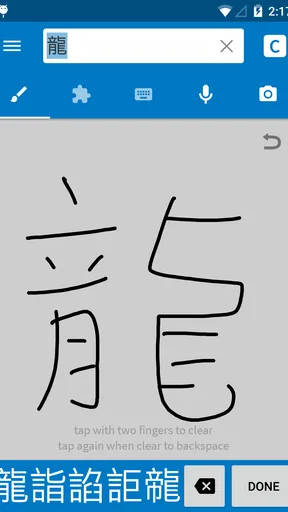
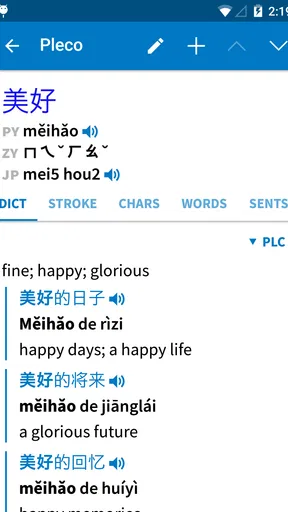
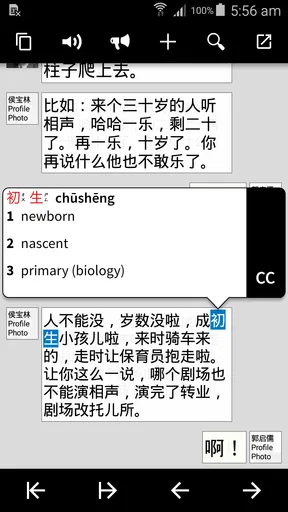

 Analysis by AppCompare
I tend to trust a language tool most when I can see what it helps me do and make choices about how I use it. Pleco Chinese Dictionary is built around looking up Chinese, rather than turning every study session into a lesson plan. That makes it useful in small, practical moments: checking a character in a book, comparing possible meanings, or saving a new word to revisit later. It is a free Books & Reference app from Pleco, and its broad dictionary focus is the main reason I would consider keeping it close at hand.
What I check before relying on a dictionary
A dictionary can feel authoritative simply because it returns an answer quickly. I try not to treat any single translation as a complete explanation, especially when a word depends on context, tone, or the sentence around it. Pleco is most helpful when I use its entries as a starting point: I look at the available senses and examples, then decide which meaning fits what I am reading.
That distinction matters for beginners. A short English equivalent can make a word seem simpler than it is, while a longer entry may reveal that it has several uses. I would use the app to support reading and study, but I would not expect a dictionary lookup alone to explain every nuance or teach me how a phrase sounds in natural conversation.
Choices that shape a lookup
The app brings several ways to reach a search result together. I can type English, Pinyin, or Chinese characters, and handwriting recognition gives me another route when I do not know how to enter a character. That is a particularly useful choice when a printed word is unfamiliar: rather than guessing its pronunciation first, I can try to draw it and then inspect the result.
Voice input and audio pronunciation serve different purposes. Speaking a word can be convenient when my hands are occupied, while listening to a pronunciation gives me something to compare against my own attempt. I would still treat voice recognition as a convenience, not a substitute for checking the written entry; an unclear spoken query can send a search in the wrong direction.
When the material is on paper or a screen
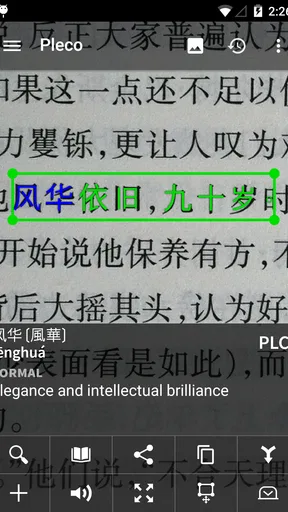
OCR is relevant when Chinese text is already in front of me and typing it would be slow. It can turn a sign, menu, or passage into a lookup workflow, which is a different kind of help from a conventional dictionary search. I would check the recognized characters before relying on the translation, particularly with small, stylized, or crowded text. Recognition can save effort, but it does not remove the need to verify what was captured.
This is also where I would think carefully about the material I point a camera at. A menu or a short public notice is a simple use case; personal messages, documents, or other sensitive text deserve more caution. I would make a deliberate choice about what I scan and avoid treating any camera-based reading tool as a private notebook. The practical benefit is speed, not a reason to overlook the sensitivity of the text.
Worth Reading Before You Choose

Flipboard Shows What News Apps Must Do Beyond the Feed

Switching to Android Auto Means Rethinking Your Driving Routine

Google Calendar Makes a Crowded Week Easier to Manage

Ludo King Makes the Most of the Minutes Between Plans

Baby Panda World Brings Quick Play to Modern Phones, but Its Game Library Feels Busy

ESPN’s Live Game View Makes Following Close Games Easier
Learning tools are most useful when they fit a routine
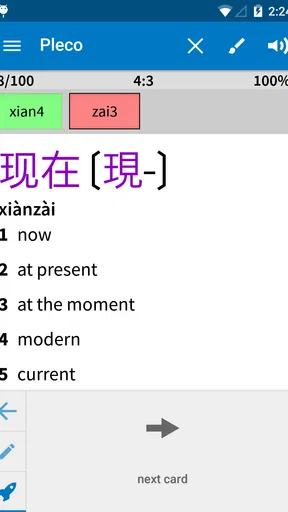
Flashcards make more sense to me when I add words I have actually encountered, rather than trying to collect every unfamiliar entry. A small deck drawn from a chapter, lesson, or conversation gives me a clearer reason to review each card. It also makes the dictionary useful beyond the moment of lookup: I can turn a passing question into material for later practice.
Audio can help me notice pronunciation details that a written definition cannot convey, but I would pair listening with repetition and context. When I am uncertain about a tone, replaying a word is a useful check; it is not the same as practicing a full sentence or receiving feedback on my own speech. That is a healthy boundary for a reference app: it can support study without replacing a teacher or conversation partner.
The app has a 4.6 average from around 44,000 ratings, and it has been installed over 5 million times. Those figures suggest that it has found a substantial audience, but they do not tell me whether its approach suits an individual learner. I would judge it by whether its search methods and reference tools fit the way I encounter Chinese day to day.
Using Pleco with care and purpose
I use Pleco most confidently when I treat it as a reference I can question, not as an authority that settles every ambiguity. This section looks at how I choose what to search, what to scan, and when I prefer a simpler tool, so the convenience stays matched to the task. That careful approach matters especially when Chinese text is personal or the context changes a word’s meaning.
What the free starting point means
The core app is free, so I can explore its dictionary workflow before deciding whether I want more. In-app purchases range from $2.99 to $199.99 per item, which is a wide span and a good reason to check what an individual add-on offers before buying it. I would begin with the basic lookup features and only consider a paid extra when I can name a specific need it would solve.
That approach is especially sensible for a casual learner. If I only need to check a few words now and then, paying for extra dictionaries or OCR may not improve my everyday experience enough to justify the cost. Someone who reads Chinese regularly, however, may value specialized reference options or a faster way to handle text. The right choice depends on how often those tasks arise, not on the number of features available.
Fit, friction, and alternatives
As a reference app, Pleco suits people who want to search deliberately and explore an entry. It may be less suitable for someone who wants a guided course with lessons, speaking practice, and a clear daily sequence. A general-purpose translator can be quicker for a one-off sentence, while a structured language-learning app may be better for building a routine from the ground up. I see Pleco as strongest when the question is “What does this word or character mean?” rather than “What should I study next?”
Its range of search methods also means there is a little more to learn than with a bare search box. A beginner may need time to get comfortable switching between English, Pinyin, handwriting, audio, and other reference options. I would not call that a serious obstacle, but it does reward exploration. If all I want is a fast translation with no interest in examining the entry, a simpler tool may feel more direct.
Everyday use without overreliance
Imagine I am looking at a restaurant menu and come across a character I cannot read. I can try handwriting recognition, inspect the suggested entry, and use the surrounding words to decide which sense fits. If I am unsure, I can compare the result with the rest of the dish description rather than ordering based on one isolated English gloss. Later, I can save the useful vocabulary to a flashcard deck and listen to its pronunciation when I have a quiet moment.
That sequence is more valuable than treating the app as a magic answer machine. It combines identification, context, and review, while leaving me responsible for checking whether a result makes sense. For travel, reading, or study, this is a practical way to use a pocket dictionary without expecting it to interpret every situation perfectly.
A cautious recommendation
The app is rated for Everyone, and its history as a reference tool stretches back to its release on January 25, 2012. I would recommend it to learners and readers who want a Chinese dictionary with several routes into a search and the option to build personal vocabulary practice around what they find. I would steer someone toward a course-based app or a quick translator instead if they mainly want guided lessons or instant sentence-level help.
For me, the best way to start is to use the free dictionary for a few real questions, test handwriting or audio only when those methods help, and keep flashcards focused on words I expect to meet again. I would also review the details of any purchase before paying, and be selective about text I scan. Used that way, Pleco Chinese Dictionary feels like a capable reference companion rather than a promise to solve every part of learning Chinese.
If you've ever found yourself lost in translation while learning Chinese, you're not alone. I've been there too, and that's why I was super excited to try out the Pleco Chinese Dictionary. Spoiler alert: it did not disappoint. Let’s dive into it!
First Impressions: A Seamless Experience
The first thing that caught my eye when I opened the app was its clean and intuitive interface. It's like stepping into a library where everything is neatly organized and easy to access. Whether you're a beginner or an advanced learner, navigating this app feels like a breeze.
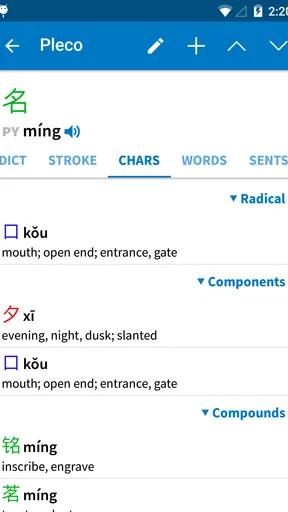
Upon launching, you're greeted with a straightforward search bar that allows you to input words in English, Pinyin, or even Chinese characters. The app instantly provides comprehensive results, which I found incredibly helpful. It’s like having a language guide in your pocket!
Diving Deeper: Features that Stand Out
Now, let’s talk about what makes this app truly special. One of my favorite features is the handwriting recognition. It’s perfect for those moments when you stumble upon a character in a restaurant menu or on a street sign that you just can't type. Just sketch it out with your finger, and voilà, Pleco identifies it for you. It’s like magic!
The app also supports voice input, which is a lifesaver when you're on the go. I tested it by speaking a few words, and the accuracy was impressive. It picked up my pronunciation with ease, and I got the translations immediately. Talk about convenience!
Another feature worth mentioning is the extensive dictionary database. Pleco houses multiple dictionaries that you can switch between, offering definitions, example sentences, and even etymology. It’s like having multiple language experts at your disposal.
Enhancing Your Learning Journey
One of the things that sets Pleco apart is its ability to cater to different learning styles. For visual learners like me, the app’s flashcard system is a game-changer. You can create your own decks, test your knowledge, and track your progress over time. It's an effective way to retain vocabulary without feeling overwhelmed.
The app also offers audio pronunciations. Listening to native speakers pronounce words helps immensely with getting the tones right. Trust me, this feature is a godsend for mastering those tricky Chinese tones.
Customizing Your Experience
Pleco is incredibly customizable, which I appreciate. You can adjust the font size, the color themes, and even the way search results are displayed. It’s all about making the app work for you, which is why it caters to both casual learners and serious scholars.
For those who want to go the extra mile, Pleco offers in-app purchases for additional features like OCR (Optical Character Recognition) and additional dictionaries. While the basic app is free and quite robust, these add-ons can significantly enhance your learning experience.
Final Thoughts: A Must-Have for Chinese Learners
After spending some quality time with the app, I can confidently say it's a must-have for anyone serious about learning Chinese. Its user-friendly design, coupled with powerful features, makes it an invaluable tool in your language-learning arsenal.
Whether you're deciphering a complex text or simply trying to order the right dish at a Chinese restaurant, Pleco has got you covered. It’s like having a personal language tutor available around the clock. So, if you’re on the fence about downloading it, just dive in. You won’t regret it!
Pros
- Comprehensive Chinese-English dictionary.
- Includes handwriting recognition feature.
- Supports OCR for text scanning.
- Offline access to dictionary entries.
- Customizable flashcards for learning.
Cons
- Interface can feel overwhelming at first.
- Some features require in-app purchases.
- Limited support for non-Chinese languages.
- Occasional OCR inaccuracies.
- Heavy on device storage space.
FAQs for Pleco Chinese Dictionary
What features does the Pleco Chinese Dictionary offer?
Pleco Chinese Dictionary offers a comprehensive set of features including a powerful dictionary with multiple translations, handwriting recognition for Chinese characters, audio pronunciations by native speakers, and a flashcard system for vocabulary building. Additionally, it supports optical character recognition (OCR) to translate text directly from your camera.
Is Pleco Chinese Dictionary suitable for beginners?
Yes, Pleco is ideal for learners at all levels, including beginners. It provides intuitive tools like stroke order diagrams, example sentences, and detailed explanations. Its user-friendly interface and customizable learning tools make it accessible and helpful for those just starting to learn Chinese.
Are there in-app purchases in Pleco Chinese Dictionary?
While the basic version of Pleco is free and quite functional, it does offer in-app purchases to enhance your experience. These include additional dictionaries, advanced optical character recognition, and professional-grade audio recordings. These purchases can significantly expand the app’s capabilities.
Can Pleco be used offline?
Yes, Pleco can be used offline, which is a significant advantage for travelers or students without consistent internet access. Once downloaded, the dictionary and many of its features, such as handwriting recognition and flashcards, work without an internet connection.
How customizable is the Pleco app?
Pleco is highly customizable, allowing users to tailor their learning experience. You can adjust settings for font size, color themes, and toolbar configurations. Additionally, the app allows users to create custom flashcard decks and choose which dictionaries to prioritize for searches.


